
Image compression, built for macOS.
Drag and drop your images, shrink their size, and keep every bit of quality. JPGBoost compresses and converts your files right on your Mac to AVIF, JPEG XL, WebP, PNG, HEIC, or JPEG. A fast, simple, private experience entirely on your device.
macOS Tahoe 26.6 or later · Apple Silicon & Intel · Free, no account required
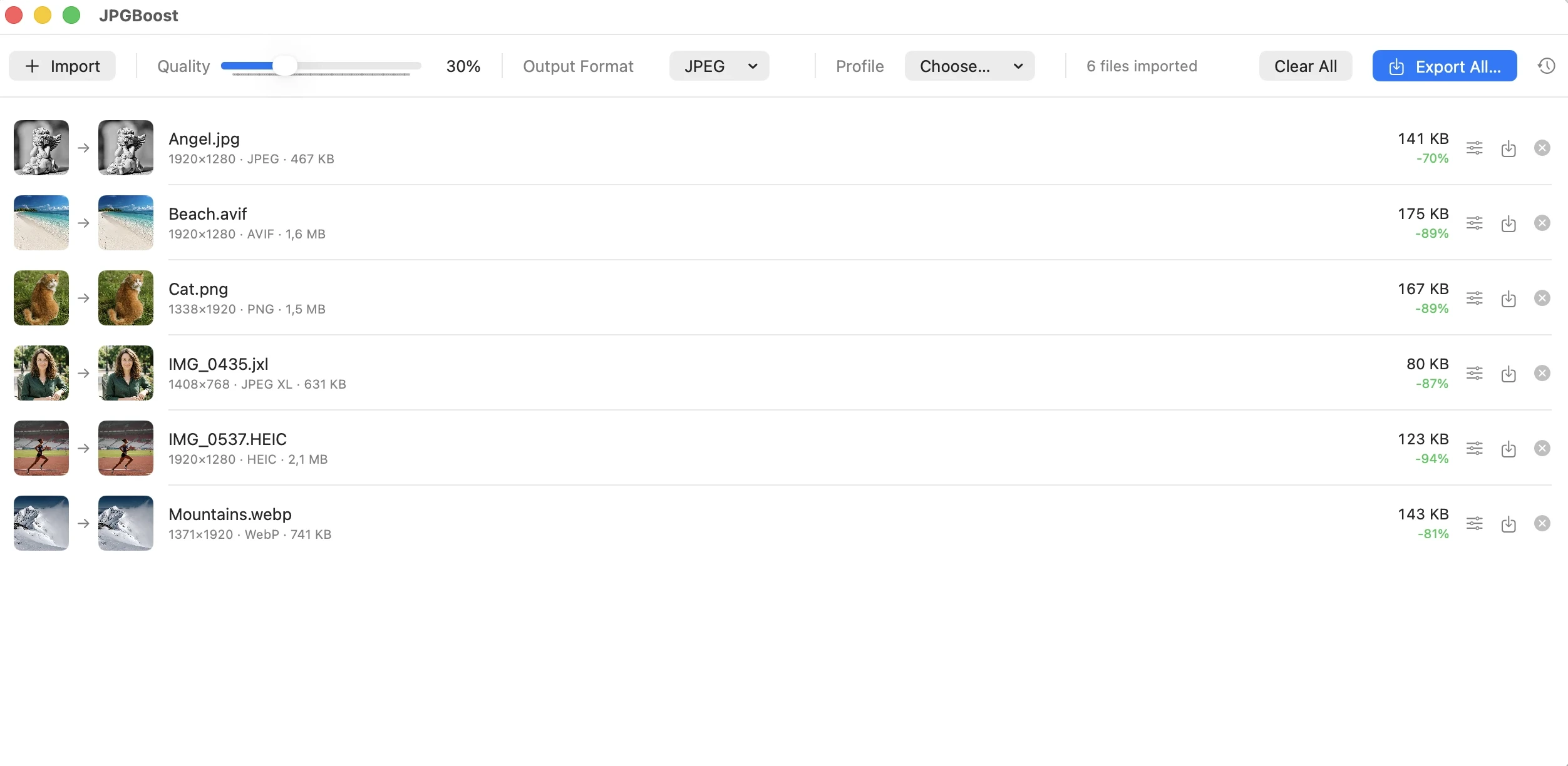
Every modern format, in one app.
Import your images in their original format and simply choose the export format that fits your needs. JPGBoost runs on a fast native engine, with no extra dependencies to install.
Next-generation compression delivering outstanding image quality with ultra-light files. Ideal for the modern web.
The format of the future, offering maximum image quality, highly efficient compression, and HDR support.
The format developed by Google. Lightweight, efficient, and widely supported across browsers and apps.
Efficient compression with preserved transparency that keeps logos and cut-out visuals looking their best.
Apple's native format, ideal for photos and iPhone exports.
The universal format, compatible with every device, app, and browser.
See the difference before you export.
Never compress blind. JPGBoost's before/after comparator lets you see the result immediately, with the format, file size, and reduction percentage shown directly on the image.
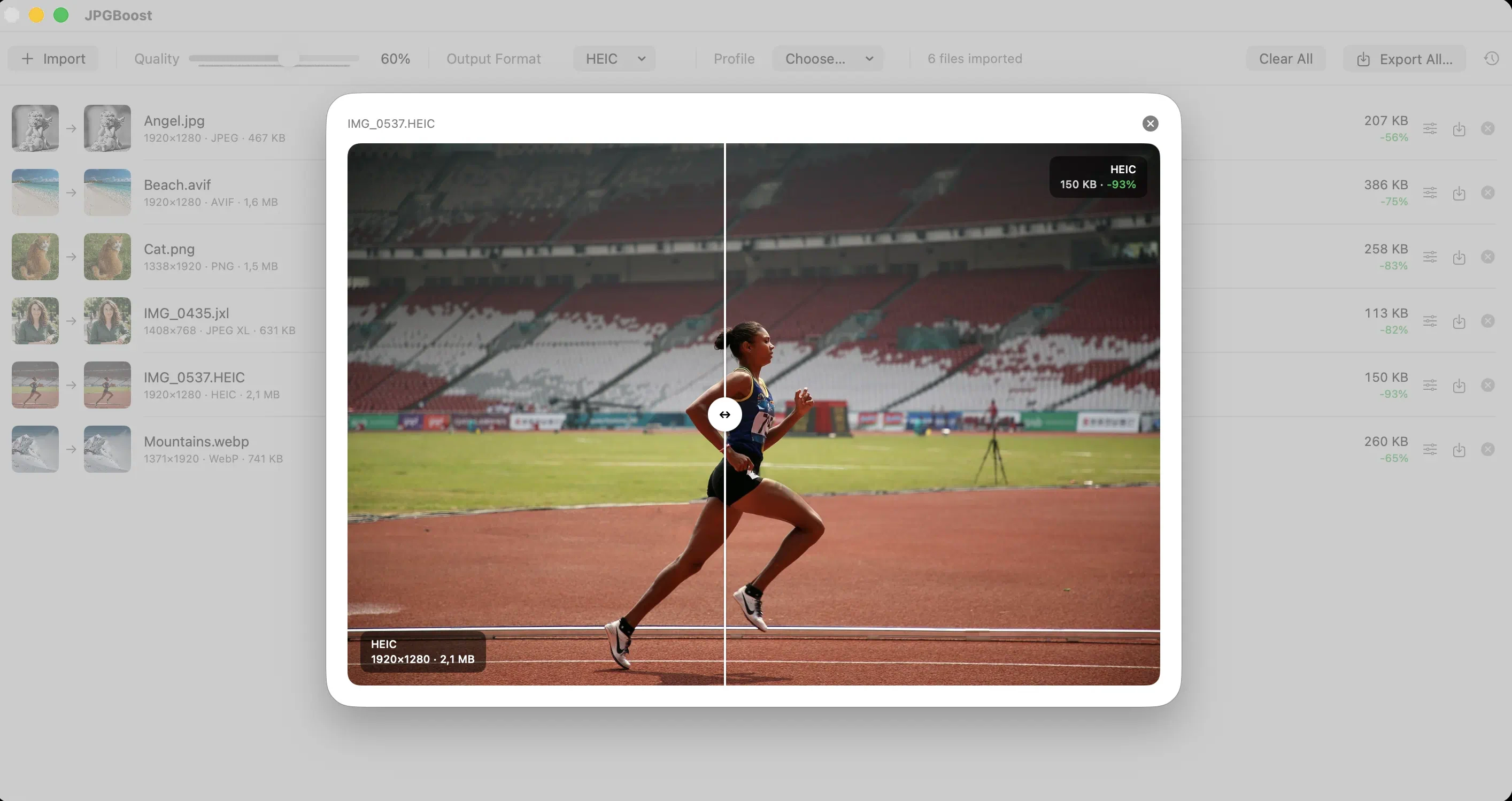
See JPGBoost in action with a real preview of the app.
Easy to pick up. Powerful when you need it.
A smooth, intuitive experience that adapts to the way you work, from everyday compression to the most demanding professional workflows.
Batch import
Process your images in seconds. Drag and drop files or import a whole folder, then organize your processing list with ease. Your session is saved automatically, so you can pick up right where you left off.
Per-image custom quality
Stay in control of every detail. Apply a global setting to your whole batch, then fine-tune specific images whenever a project needs special treatment.
Optimized performance
Your Mac's power, put to work on your images. JPGBoost intelligently uses the resources available to process your files in parallel. Even with thousands of images, the interface stays smooth and responsive throughout.
Before/after preview
Compare before you export. See the result instantly with side-by-side previews. The interactive comparator lets you check quality, format, file size, and savings before confirming your export.
Reliable file-by-file processing
Nothing ever stalls your batch. An error on one image never blocks your workflow. Every issue is clearly flagged and can be fixed instantly with a dedicated recovery action.
Available in 15 languages
JPGBoost automatically adapts to your Mac's language, while still letting you choose your own preference.
Flexible, secure export
Export it your way. Export your entire batch, or only the files you've selected. Your history is kept between sessions, and built-in safeguards prevent accidental overwrites.
A truly self-contained app
Install, launch, optimize. Every dependency it needs is bundled directly inside JPGBoost. No extra tools, no complex setup, no third-party software to install.
Native keyboard shortcuts
Save time with the essential commands right at your fingertips.
⌘O: import files
⌘E: export the full batch
⌘+ / ⌘−: adjust quality
Privacy-respecting updates
You stay in control at every step. JPGBoost only checks whether a new version is available when you ask it to. No automatic downloads, no forced installs, no information sent from your Mac.
Your workflow. Your images. Your way of working.
JPGBoost fits everyday needs just as well as professional production, with tools built for developers, photographers, creators, and technical teams.
Web developers
Automatically optimize your images for the web. Batch export your assets to AVIF, WebP, or JPEG XL, and integrate JPGBoost into your CI/CD pipelines with its CLI.
Photographers
Deliver lighter galleries without compromising on quality. Choose the format, the compression level, and check every image with a before/after comparator.
Content creators
Speed up your site's load times and publish visuals optimized for social media, with visual quality preserved.
Studios & agencies
Automate the batch compression of thousands of images with named, reusable export profiles you can carry from project to project.
Technical teams
Integrate JPGBoost into your existing infrastructure using a watched folder, the CLI, or the local API, with no cloud service dependency.
macOS automation
JPGBoost fits naturally into your Mac. Drive your optimizations from Shortcuts, Spotlight, or AppleScript, and build custom workflows to automate your everyday tasks.
Connect JPGBoost to your tools.
Four ways to automate, speed up, and simplify your workflows.
Local API
Connect JPGBoost to your tools with an HTTP/JSON API available only on the local machine (127.0.0.1),
protected by token authentication. Automate your imports, configure your settings, and trigger exports from your own scripts,
all while keeping your data on your Mac.
curl -s -H "Authorization: Bearer $TOKEN" \
  -X POST -d '{"quality": 60, "format": "webp"}' \
http://127.0.0.1:51823/v1/settingsCLI
Automate your optimizations with jpgboost-cli. Built on the same encoding engine as the JPGBoost app, this command-line tool fits naturally into your scripts, automated workflows, and CI/CD pipelines.
Included directly with the app, with no extra dependency or setup.
jpgboost-cli photo1.jpg photo2.png \
  --quality 60 --format webp --output ./compressed
# photo1.jpg: 4.2 MB → 890 KB (-79%)Shortcuts & AppleScript
Use a native "Compress Images" action in Shortcuts, control your workflows with Spotlight, and automate your processing via AppleScript and Automator.
tell application "JPGBoost"
  compress {"image1.png"} to "/output" ¬
    format "webp" quality 60
end tellWatched folders
Folders that work for you. Set up a watched folder and let JPGBoost automatically detect, compress, and export your images based on your export profiles, without any manual intervention.
Watched folder      → ~/Downloads/to-compress
Destination folder  → ~/Downloads/compressed
Profile             → "Web JPEG" (jpeg · q 60)
Your settings, available everywhere. Create custom export profiles with your preferred format, quality, and destination, then apply them instantly in the app, the CLI, the API, or your Shortcuts automations.
Unlock the full power of JPGBoost.
A single online activation is all it takes, with no account to create. Your license is then managed locally on your Mac, with no automatic connection to any server. Connections only happen when you take a deliberate license-related action. A simple, fast, privacy-respecting experience.
JPGBoost Free
$0
- ✓ Import and export to AVIF, JPEG XL, WebP, PNG, HEIC, and JPEG
- ✓ Quality adjustable globally or per image
- ✓ Built-in before/after comparator, one click away
- ✓ Fast export, one at a time or in batches
- ✓ Built-in automation within your daily quota, including the local API, one watched folder, Shortcuts, AppleScript, and one export profile.
- ✓ Files up to 5 MB included
- ✓ Up to 50 images processed per day
- ✓ Security updates included
JPGBoost Pro
$49.90lifetime license, one-time payment
- ✓ Everything in JPGBoost Free, with no limits
- ✓ Files and processing with no size or quota limits
- ✓ Automation without limits using the local API, watched folders, Shortcuts, AppleScript, and unlimited export profiles.
- ✓ jpgboost-cli brings headless automation to servers and scheduled workflows.
- ✓ One user license covering up to 2 installations
- ✓ Security updates and new features included
By purchasing, you accept the terms of sale. You'll receive your activation token by email — how to activate it.
Everything you need to know.
The free version gives you everything that runs with the app open, namely compression and conversion across all 6 formats, per-image settings, the before/after preview, and also the local API, watched folders, Shortcuts and AppleScript integration, and export profiles. It is limited to 5 MB per file, 50 images a day, a single watched folder, and a single export profile. The paid version removes these limits and adds jpgboost-cli, the command-line tool that runs with no interface at all, built for servers, scheduled tasks and continuous integration.
Yes. This software respects your privacy. Your files stay on your Mac and are never sent to an external server. Compression happens entirely offline. The only possible connections are related to activating a Pro license, pairing another device, or checking for updates. All of these actions are triggered manually by you.
Even the local API, available on Free as well as Pro, only runs on the loopback interface 127.0.0.1 and is never reachable from the network.
Exporting an image also strips its EXIF metadata, such as GPS location, capture date, and camera model, keeping only the orientation needed to display it correctly.
Yes. JPGBoost ships as a universal binary, compatible with Apple Silicon (arm64) and Intel (x86_64) Macs. The app requires macOS Tahoe 26.6 at minimum.
AVIF is supported starting with macOS 13, while native JPEG XL decoding requires macOS 15 Sequoia.
Buy your Pro license to immediately receive a single-use activation token by email.
In JPGBoost, open Settings (⌘,) → License → Activate My License, then paste the token. Your Pro access is activated instantly, with no need to restart the app or create an account.
Using a second Mac? Add it afterward, entirely on your own, with the pairing code.
Find activation details, troubleshooting steps, and device management in the license documentation.
Yes, exporting to PNG, WebP, JPEG XL, HEIC, and AVIF preserves the alpha channel.
JPEG is the exception, since that format doesn't support transparency. Transparent areas are flattened onto white, the same way Preview, Photoshop, or ImageMagick handle it, rather than rendered as black.
Yes, up to two installations. The app and the CLI each count as one installation, even on the same Mac. For example, you could keep the app on your desktop and run the CLI on a server, or activate the app on both a laptop and a desktop, added on your own from Settings → License with a pairing code.
A separate license is still required beyond those two installations, or for a machine shared with someone else.
Yes. The Pro license isn't reserved for businesses. It can be purchased and activated the same way by an individual, a freelancer, or a team.
No business invoice, VAT number, or account creation is required.
Activation is as simple as pasting the token you receive by email after purchase directly into Settings → License on your Mac.
Yes. The CLI can process thousands of files in parallel with the --jobs option, while keeping memory usage to a single file per task.
The app also handles large batches concurrently without blocking the interface, even when processing several thousand images.
No. JPGBoost never updates itself automatically. The update check, configurable from Settings, simply compares your installed version with the latest available one and lets you know, if relevant, that a new version exists, with a link to the download page.
No file is ever downloaded or installed automatically, and no information about your Mac is collected or transmitted during this check. This feature is available in both the Free and Pro versions.