
How to Automate Image Compression in Your CI Pipeline with jpgboost-cli
A repository that accumulates uncompressed JPEGs and PNGs hurts your LCP while making every clone heavier. jpgboost-cli lets you automate their compression directly in your CI pipeline, without relying on each contributor's vigilance. This article covers its integration with GitLab CI, compares two opposite strategies, and goes over the pitfalls that can get expensive in production.
The real cost of uncompressed images
Every image committed without compression leaves a trace in the Git history as a blob containing its content. Even once the image is later replaced by a lighter version, the old blob stays in the history. A git clone also fetches that history. So the weight of old images keeps weighing on the repository, even once they're no longer in use.
On a repository that accumulates screenshots, marketing visuals, or design exports over several months, this dead weight can quickly reach several hundred megabytes. That slows down clones in CI and increases bandwidth usage for every contributor.
On the production side, the problem doesn't stop at the repository. An oversized image directly hurts Largest Contentful Paint (LCP), especially when the largest above-the-fold image becomes the element that determines the metric. The gain from compression can be substantial. In the jpgboost-cli documentation's own example, a 4.2 MB JPEG drops to just 890 KB, a 79% reduction.
Manual compression doesn't scale. It relies on individual habit. On every pull request, each contributor has to remember to optimize images before committing them. In practice, this step gets skipped easily once time pressure or urgency picks up. The problem is usually only discovered weeks later, when an audit or a performance report reveals the accumulated debt.
Why automate in CI rather than locally or server-side
Compressing images locally, for example with a pre-commit Git hook, always depends on the machine and the contributor's discipline. A hook can be bypassed, uninstalled, or simply missing on the machine of a designer who commits files directly.
Server-side compression, on the other hand, kicks in too late. The images have already been indexed and may already have been served once. The problem is therefore visible to the first visitors, and the optimization then has to be redone on every deploy.
CI is the most reliable checkpoint. It runs on every pull request, doesn't depend on the local machine's setup, and produces a visible, traceable result in the job logs. That single choke point is what makes automation worthwhile, even though it comes with an infrastructure cost that needs to be accounted for from the start.
That cost matters more here because jpgboost-cli isn't a standalone binary you can install through a package manager. It ships with JPGBoost.app, only runs on macOS 15 or later, and requires a Pro license.
The rest of this article is therefore built on one specific assumption: a persistent, self-hosted macOS runner, to have a stable environment and keep the JPGBoost.app installation in place from one job to the next.
Install jpgboost-cli and test it locally
On the runner, as in local testing, the binary ships inside the app bundle. A symlink created once lets you call it from any folder afterward.
# Symlink once, to call jpgboost-cli from any folder
sudo ln -s /Applications/JPGBoost.app/Contents/MacOS/jpgboost-cli /usr/local/bin/jpgboost-cli

# Check that the command responds
jpgboost-cli --help
The Pro license is then activated once, manually, on the runner. This never happens inside the pipeline itself. If this is the very first install to activate this license, use the token you received by email after purchase.
# This machine's identifier, to share with support if needed
jpgboost-cli --machine-id

# First activation, with the token received by email after purchase
jpgboost-cli --activate ACT-XXXX-XXXX-XXXX-XXXX-XXXX
If the license has already been activated elsewhere (typically on the app, for personal use), --activate isn't the right approach anymore. The runner needs to join that existing license rather than activate a new one. From the already-activated device, generate a code, then use it on the runner.
# From the already-activated device (the app, or another CLI), generates a code
jpgboost-cli --add-device

# On the runner, joins the existing license with this code
jpgboost-cli --pair XXXX-XXXX
This activation, by either method, counts as one of the two installs covered by the Pro license. Since the app and the CLI count as two separate installs, activating on every job would burn through the quota fast: with just two runs, the license would already be fully used up. That's why the runner needs to stay persistent, to keep the activation from one job to the next.
Quick local test before going further.
# Two files to WebP, quality 60
jpgboost-cli photo1.jpg photo2.png --quality 60 --format webp --output ./compressed
Configure GitLab (runner and push token)
Before pasting the .gitlab-ci.yml file below, two things need to be set up once on the GitLab side: registering the runner, and creating the token the correction job needs to push.
Register the runner
On the Mac chosen as the persistent runner (the one where jpgboost-cli and its license are already installed from the previous section), register the runner with the macos tag used by both jobs.
gitlab-runner register \
  --url https://gitlab.com \
  --token <PROJECT_REGISTRATION_TOKEN>
The registration token is under Settings > CI/CD > Runners > New project runner (the UI generates a single-use token for this registration, rather than the old shared registration token). --executor shell matters here: unlike a Docker executor, it runs commands directly on the runner's system, which is essential to find jpgboost-cli already installed and its license already activated from one job to the next, instead of starting from a clean environment every time.
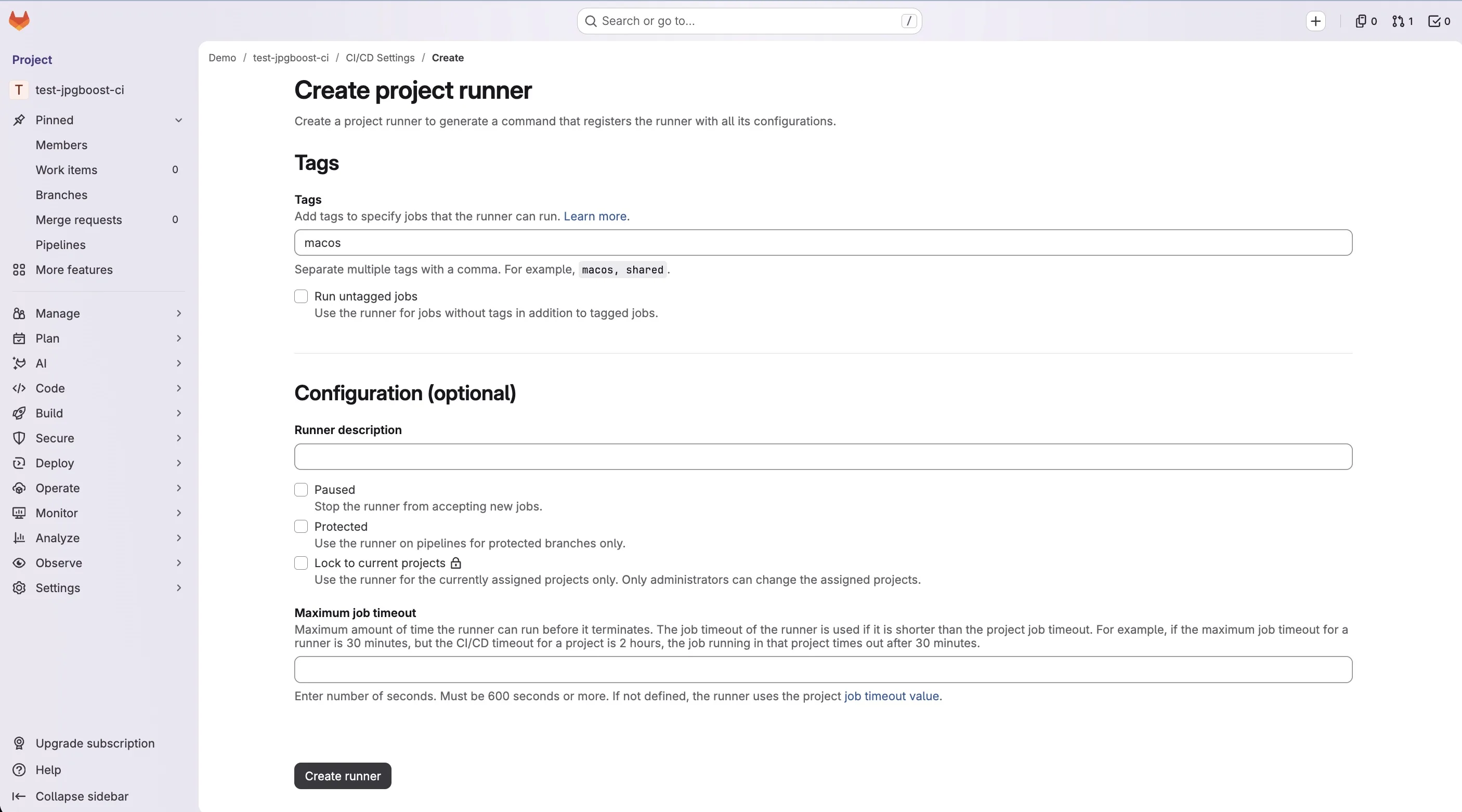
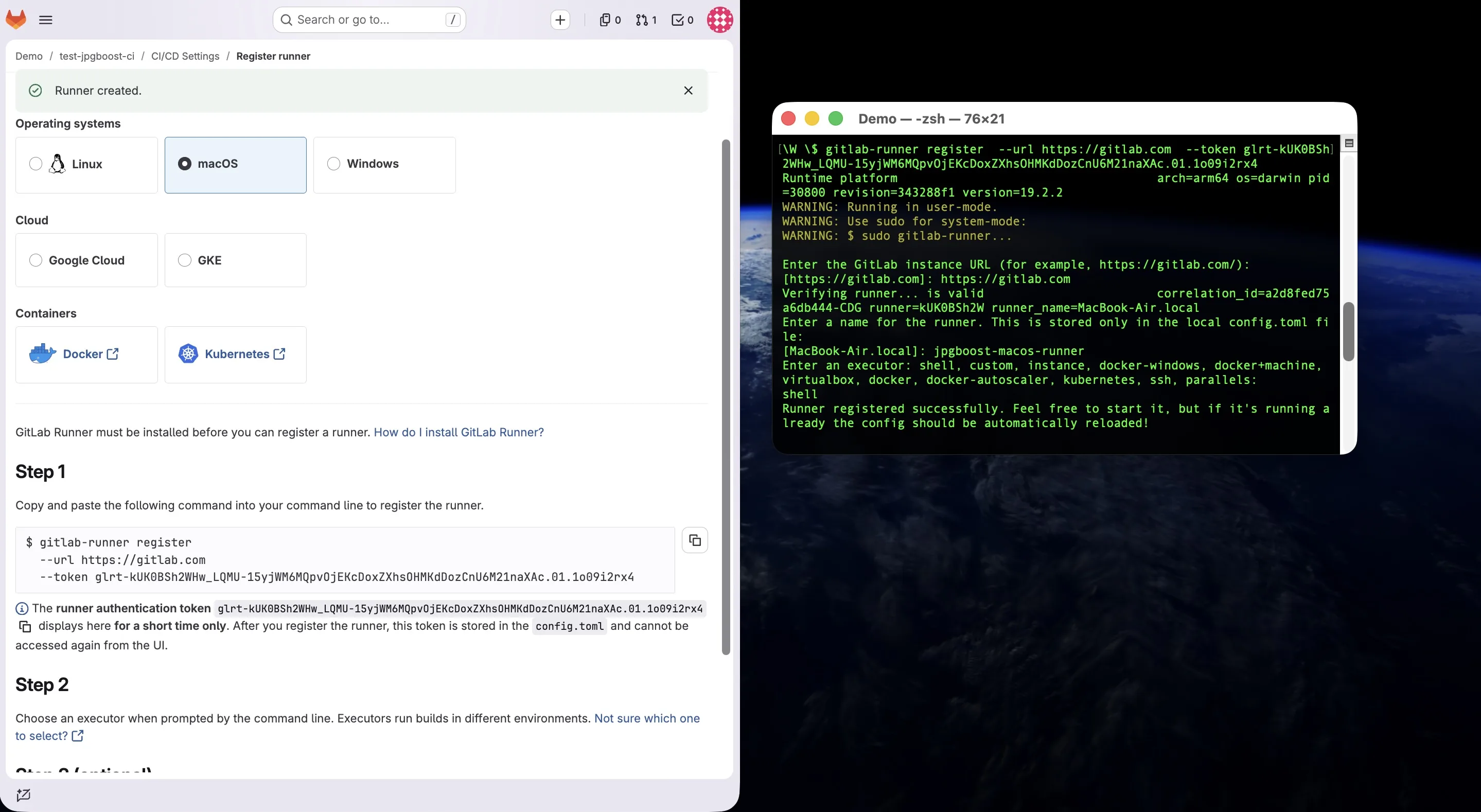
gitlab-runner register asks for the runner name, then the executor, interactively; answer shell to that last question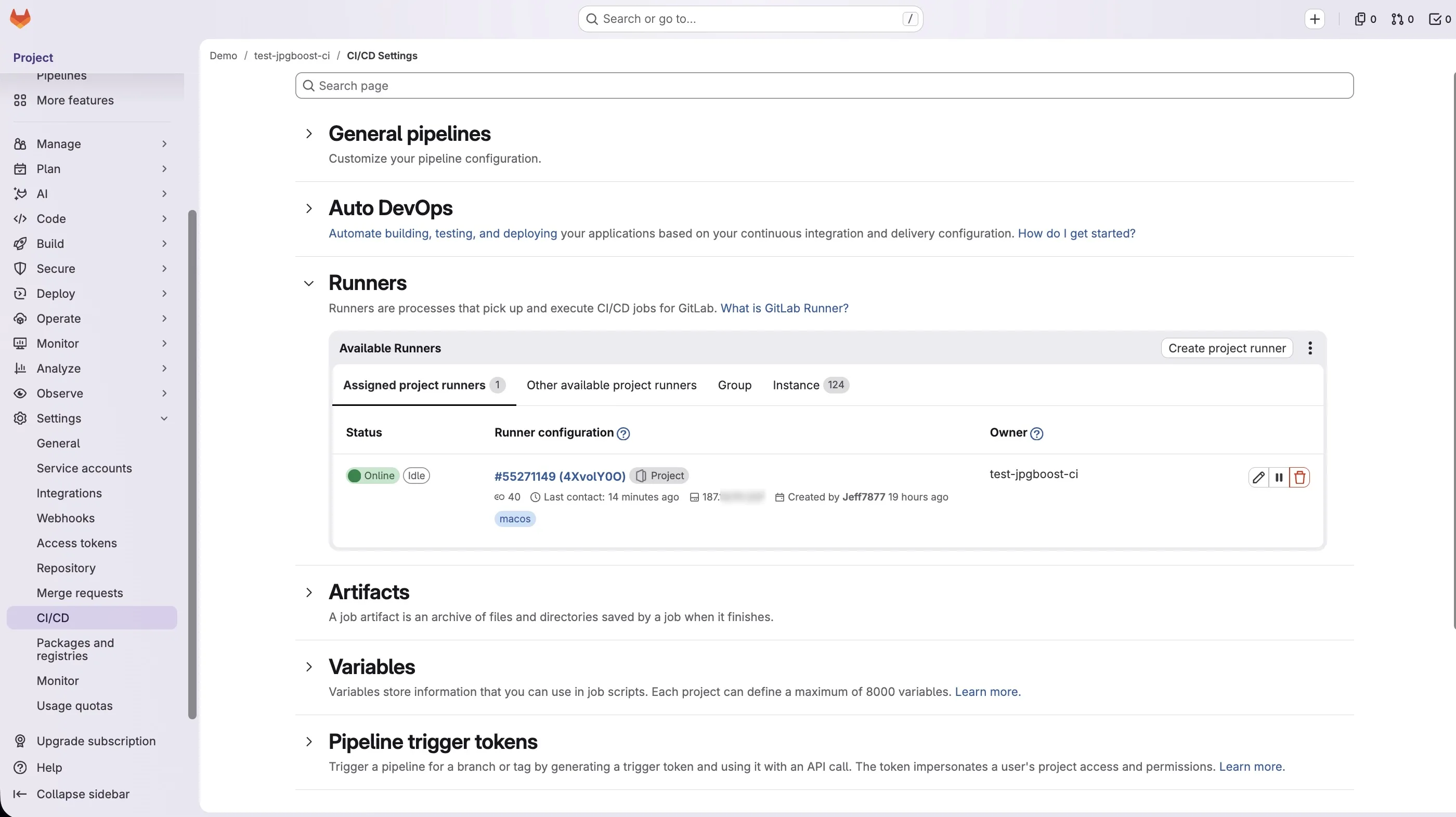
Create the push token
The fix-image-weight job pushes a commit to the merge request branch. The CI_JOB_TOKEN automatically provided to every job doesn't have the write access needed on a protected branch, so a dedicated token is required.
A Project Access Token (Settings > Access Tokens on the project) is, in theory, the cleanest choice: tied to the project rather than an account, it survives the departure of whoever created it. But on a personal namespace on the free tier, GitLab.com doesn't offer this feature (it's reserved for paid groups), which is the most common reason to use a Personal Access Token instead.
A Personal Access Token is created from the user account's settings, not the project's (Avatar > Edit profile > Access Tokens), with:
- Scope
write_repository - An expiration date consistent with your token rotation policy
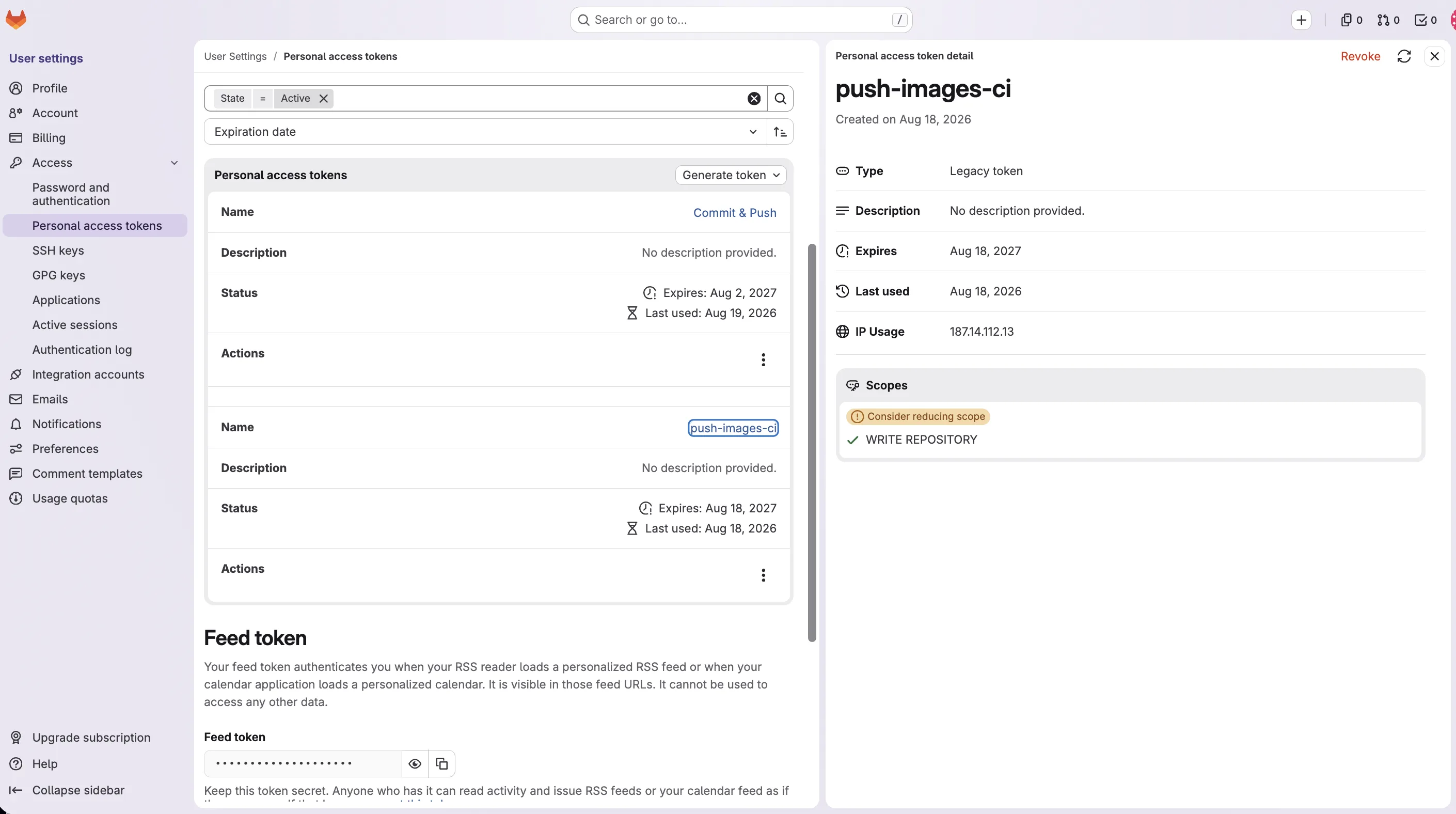
One trade-off to know before going this route: the token is tied to the account that created it. If that account is disabled, loses access to the project, or the person leaves the team, the correction job stops being able to push, with no warning before it happens. On a team project, it's better to create it from a dedicated service account rather than a contributor's personal account.
The generated token is shown only once: copy it right away, then add it under Settings > CI/CD > Variables on the project as PUSH_TOKEN, with the Masked and Protected options checked if your merge requests target a protected branch.
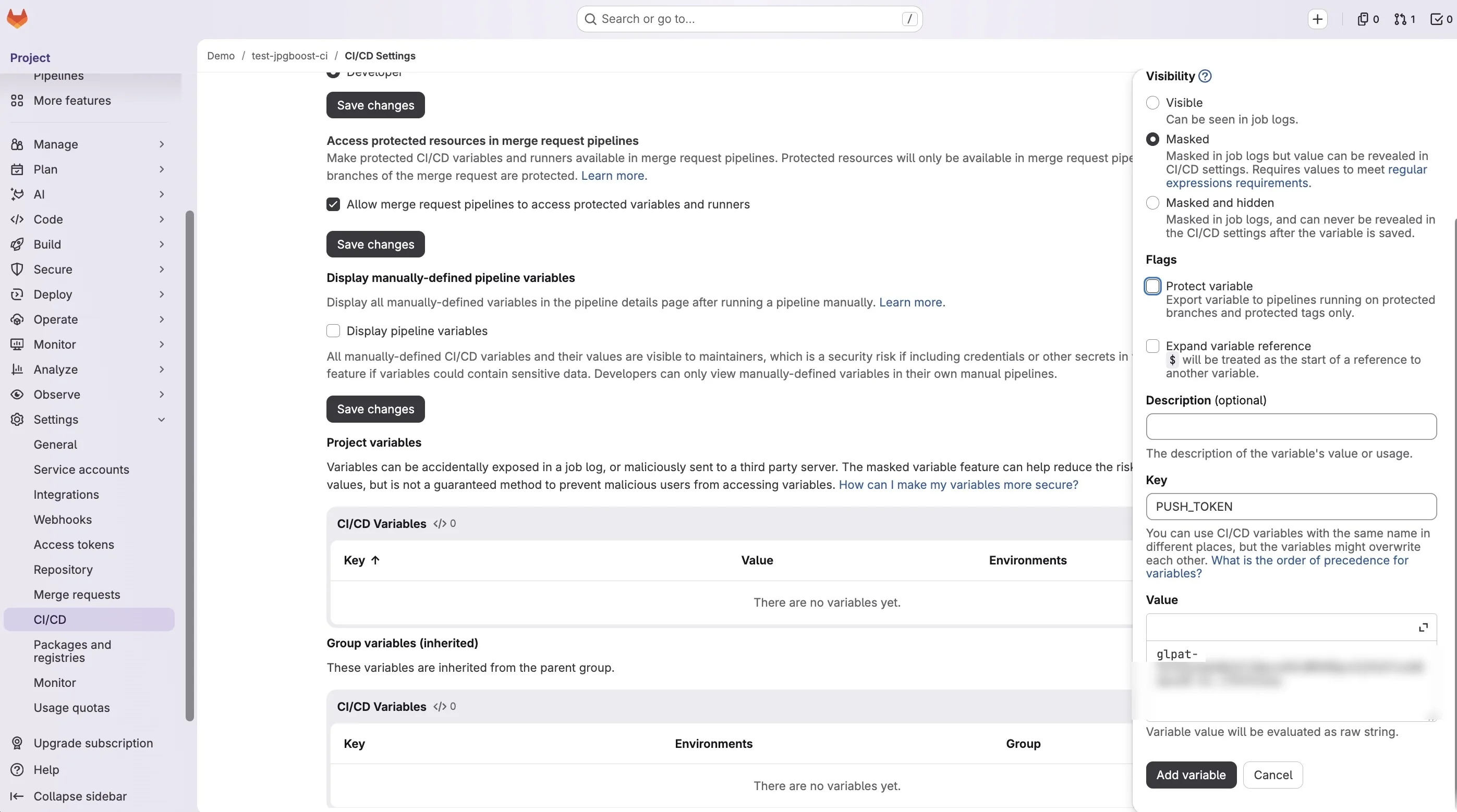
PUSH_TOKEN, used further down in the .gitlab-ci.ymlIf the source branch of your merge requests is itself protected, the account tied to the token also needs permission to push to it directly, under Settings > Repository > Protected branches > Allowed to push and merge; otherwise the job's git push fails with an access refusal despite a valid token.
Where to put the .gitlab-ci.yml file
GitLab only looks for the pipeline in one place by default: a file named exactly .gitlab-ci.yml (with the leading dot), at the root of the repository, next to the README. A file placed in a subfolder, or named differently, is simply ignored: no error flags it, the project just behaves as if it had no CI configured.
If a different location is needed (for example a pipeline file shared across several repositories, or a monorepo setup), Settings > CI/CD > General pipelines > CI/CD configuration file lets you point to a different path, including in another project, with the path/file.yml@group/project:branch syntax. Outside that specific case, leave this field empty and keep the file at the root.
Once the file is committed and pushed, no manual activation is needed: GitLab detects it automatically on the next event that matches a rule in the file: here, opening or updating a merge request, via $CI_PIPELINE_SOURCE == "merge_request_event". The result shows up in the project's Pipelines tab, and directly in the tab of the same name on the merge request. To check the syntax before pushing, rather than finding out at the first failed pipeline, the built-in editor (Build > Pipeline editor in the project menu) includes a Validate button that calls GitLab's CI linter without triggering an actual pipeline.
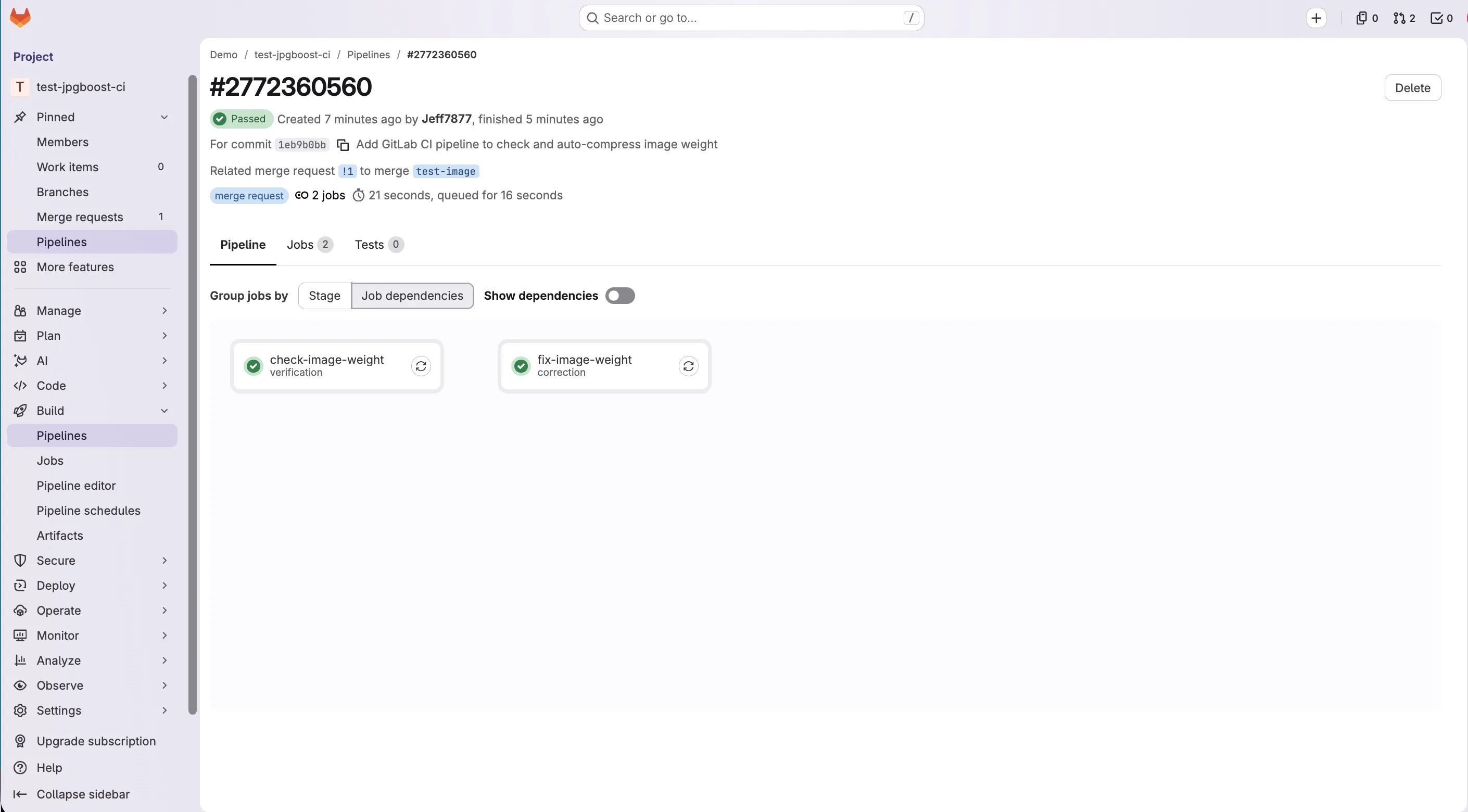
verification and correction jobsGitLab CI integration
The job below targets a runner tagged macos, matching the persistent self-hosted runner described above and already activated outside the pipeline. It only runs on merge request pipelines and combines the two modes covered in the next section: checking the weight, then automatically fixing it.
# .gitlab-ci.yml
stages:
  - verification
  - correction

variables:
  # Threshold above which a compressed image fails the job (in KB)
  THRESHOLD_KB: "6000"
  # Full clone: without this, a shallow clone might not contain
  # CI_MERGE_REQUEST_DIFF_BASE_SHA and make the "git diff" below fail.
  GIT_DEPTH: "0"

check-image-weight:
  stage: verification
  tags: [macos]
  rules:
    - if: '$CI_PIPELINE_SOURCE == "merge_request_event"'
  script:
    - |
      # Check that jpgboost-cli responds before going further
      jpgboost-cli --help > /dev/null

      # Only look at images added or modified in this merge request
      # (current scope: .jpg and .png)
      FILES=$(git diff --name-only --diff-filter=ACM "$CI_MERGE_REQUEST_DIFF_BASE_SHA" -- '*.jpg' '*.png')
      if [ -z "$FILES" ]; then
        echo "No image modified in this merge request."
        exit 0
      fi

      # Test compression to WebP, in a disposable folder, to compare sizes
      mkdir -p /tmp/check-images
      # (no "readarray": macOS still ships bash 3.2, which doesn't have this
      # builtin, only introduced in bash 4)
      FILES_ARR=()
      while IFS= read -r LINE; do
        FILES_ARR+=("$LINE")
      done <<< "$FILES"
      jpgboost-cli "${FILES_ARR[@]}" --format webp --quality 75 --jobs 4 --output /tmp/check-images --json > /tmp/report.json

      # Fails the job if an image still exceeds the threshold once compressed
      THRESHOLD_BYTES=$((THRESHOLD_KB * 1000))
      OVER_LIMIT=$(jq --argjson threshold "$THRESHOLD_BYTES" '[.[] | select(.compressedSizeBytes > $threshold)] | length' /tmp/report.json)
      if [ "$OVER_LIMIT" -gt 0 ]; then
        echo "$OVER_LIMIT image(s) still exceed $THRESHOLD_KB KB once compressed:"
        jq --argjson threshold "$THRESHOLD_BYTES" -r '.[] | select(.compressedSizeBytes > $threshold) | .path' /tmp/report.json
        exit 1
      fi
      echo "All modified images are within the $THRESHOLD_KB KB threshold."

fix-image-weight:
  stage: correction
  tags: [macos]
  # Independent from the "verification" stage: otherwise this job is never
  # reached in the one case where it's actually needed (check-image-weight failing).
  needs: []
  rules:
    - if: '$CI_PIPELINE_SOURCE == "merge_request_event"'
  script:
    - |
      # Only .jpg/.png, see the equivalent comment in check-image-weight.
      FILES=$(git diff --name-only --diff-filter=ACM "$CI_MERGE_REQUEST_DIFF_BASE_SHA" -- '*.jpg' '*.png')
      if [ -z "$FILES" ]; then
        echo "No image modified in this merge request."
        exit 0
      fi

      rm -f /tmp/report.json
      THRESHOLD_BYTES=$((THRESHOLD_KB * 1000))
      MIN_QUALITY=20
      REMAINING=""

      # Converts every file to JPEG (--format jpeg, the default value): a PNG
      # compresses noticeably worse than a JPEG for a photo (see "Common
      # pitfalls"), and that's the target format expected here. Not suitable
      # for a PNG with transparency (JPEG has no alpha channel), not an issue
      # for a photo, worth revisiting if a logo or icon ever goes through this
      # pipeline.
      #
      # Steps quality down in increments as long as the result still exceeds
      # the threshold: a single pass at a fixed quality (60) isn't always enough.
      while IFS= read -r FILE; do
        FOLDER=$(dirname "$FILE")
        QUALITY=60
        while :; do
          RESULT=$(jpgboost-cli "$FILE" --format jpeg --quality "$QUALITY" --output "$FOLDER" --json)
          SIZE=$(echo "$RESULT" | jq '.[0].compressedSizeBytes // 0')
          if [ "$SIZE" -le "$THRESHOLD_BYTES" ] || [ "$QUALITY" -le "$MIN_QUALITY" ]; then
            break
          fi
          QUALITY=$((QUALITY - 15))
          if [ "$QUALITY" -lt "$MIN_QUALITY" ]; then
            QUALITY=$MIN_QUALITY
          fi
        done
        echo "$RESULT" >> /tmp/report.json
        # The output file is always <base>.jpg: if the original didn't already
        # have that extension (e.g. .png), the original needs to be removed from
        # the repo, otherwise both coexist and the old one stays uncompressed
        # indefinitely.
        case "$FILE" in
          *.jpg) : ;;
          *) git rm -q "$FILE" ;;
        esac
        if [ "$SIZE" -gt "$THRESHOLD_BYTES" ]; then
          echo "$FILE still above $THRESHOLD_KB KB after compression (quality $QUALITY, $((SIZE / 1000)) KB): manual reduction needed."
          REMAINING="$REMAINING $FILE"
        fi
      done <<< "$FILES"

      # Compression gain, visible in the job's log (see "Measuring the gain").
      # -s: /tmp/report.json contains one JSON array per file (one ">>" per
      # iteration above), "add" merges them into one before summing them.
      echo "--- Compression gain ---"
      jq -r '.[] | "\(.path) : \(.originalSizeBytes) -> \(.compressedSizeBytes) bytes (\(.ratio))"' /tmp/report.json
      echo "Total before: $(jq -s 'add | map(.originalSizeBytes) | add' /tmp/report.json) bytes"
      echo "Total after: $(jq -s 'add | map(.compressedSizeBytes) | add' /tmp/report.json) bytes"

      # git diff --quiet wouldn't see a .png removed (git rm) and replaced by an
      # untracked .jpg: status --porcelain also covers untracked files.
      if [ -z "$(git status --porcelain)" ]; then
        echo "Nothing to commit, all images were already compressed."
        exit 0
      fi

      git config user.name "jpgboost-ci"
      git config user.email "ci@example.com"
      git add -A
      # [skip ci]: without it, this push triggers a new merge_request_event
      # pipeline, which pushes another correction commit, and so on (infinite loop).
      git commit -m "Compress modified images with jpgboost-cli [skip ci]"
      # PUSH_TOKEN is a personal access token (write_repository scope), stored as
      # a masked CI/CD variable: the default CI_JOB_TOKEN isn't enough to push to
      # a protected branch.
      git remote set-url origin "https://gitlab-ci-token:${PUSH_TOKEN}@${CI_SERVER_HOST}/${CI_PROJECT_PATH}.git"
      git push origin "HEAD:${CI_MERGE_REQUEST_SOURCE_BRANCH_NAME}"

      # The best possible result is pushed either way (better than nothing), but
      # the job fails if at least one file still exceeds the threshold at minimum
      # quality, so it stays visible instead of being silently accepted.
      if [ -n "$REMAINING" ]; then
        echo "File(s) still too heavy despite compression:$REMAINING"
        exit 1
      fi
Verification mode or correction mode
The two jobs from the previous section illustrate two opposite ways to wire jpgboost-cli into a GitLab merge request. One blocks, the other fixes it in the contributor's place.
In verification mode, the check-image-weight job changes nothing. It compresses each modified image into a disposable folder, compares the resulting size to the chosen threshold, and fails CI if that threshold is exceeded. The repository stays untouched. It's up to the contributor to rework and recommit the image; the pipeline just refuses to let it merge until that's done.
In correction mode, the fix-image-weight job goes further. It compresses each image directly in place in the repository, then commits and pushes the result to the merge request branch. The contributor has nothing left to redo, but the Git history gains a commit they didn't write themselves.
| Criterion | Verification mode | Correction mode |
|---|---|---|
| Goal | Block CI if an image exceeds a threshold | Compress and push a commit to the merge request |
| Mechanism | --json + jq, comparison against a chosen threshold, then an explicit exit 1 (no built-in threshold flag) | Direct compression, in-place write, then push |
| Effect on the repo | None, the job only observes | An automatic commit added to the merge request |
| Effect on the contributor | Has to fix and recommit it themselves | Nothing more to do |
| Authentication required | None | Project access token or deploy token in a masked variable |
| Trade-off | Friction, manual fix left to the contributor | Rewrites Git history automatically, risk of conflicts with a protected branch |
In practice, verification mode suits a team that wants to keep editorial control over its images (cropping, retouching, format choice) before they enter the repository compressed. Correction mode suits a team that would rather never have to think about it, at the cost of one more automatic commit in the history and a push token to manage.
Optimizing the job
Both jobs already limit the work to files that were actually modified, via git diff --name-only --diff-filter=ACM, rather than rescanning the whole repository on every pipeline. On a repository that accumulates hundreds of images, the difference in run time is substantial.
With a persistent self-hosted runner, caching works differently. GitLab CI's cache: directive mainly exists to restore dependencies on an ephemeral runner that starts from scratch on every job. Here, JPGBoost.app is already installed on the runner and doesn't need to be re-downloaded. Adding a cache: block wouldn't add anything beyond what the runner's local storage already provides.
The --json option provides the information needed to build an idempotence mechanism. By keeping compressedSizeBytes, or better yet a hash of the file, from one run to the next, it would be possible to detect unchanged files and avoid recompressing them on every pipeline.
Parallelism, for its part, is handled natively through --jobs. Several files can be processed at once, each one decoded and released independently. Memory footprint therefore depends mainly on the --jobs value, not the total number of pending files. On a batch of 12 files, the documentation reports roughly a 4× gain between --jobs 8 and --jobs 1, a useful order of magnitude for sizing this value on your own runner, keeping in mind that AVIF and JPEG XL encoding is noticeably more CPU-intensive than JPEG or HEIC.
Common pitfalls
The first pitfall concerns the output format. The script above deliberately converts every image, PNG included, to JPEG. For a photograph, JPEG generally offers a better quality-to-size ratio than PNG: forcing --format jpeg can therefore bring a file under the size threshold where a simple quality drop wouldn't be enough. The trade-off is losing transparency, since JPEG has no alpha channel, without any error necessarily showing up in the logs. This choice works for photos, but can silently break a PNG logo or icon with a transparent background. In a repository that mixes both uses, it's better to restrict the job's scope (to a dedicated folder, for example) than to force a single format on every image.
On GitLab CI, a job in a given stage only runs by default if every job in the previous stage succeeded. But fix-image-weight only makes sense when check-image-weight detects an overage, precisely the case where, with that default behavior, it would never run. needs: [] frees the correction job from that implicit dependency and lets it run independently, in parallel with the verification job.
The correction job then pushes a commit to the branch that triggered the pipeline. Without precautions, that push can trigger a new merge request pipeline. If the result is still judged too heavy, the job fixes it again, pushes another commit, and triggers yet another pipeline. That can quickly spiral into a loop generating dozens of commits and pipelines within minutes. Adding [skip ci] to the automatic commit's message tells GitLab not to trigger a new pipeline for that commit.
The git diff run against CI_MERGE_REQUEST_DIFF_BASE_SHA also assumes that base commit is available locally. GitLab clones with a limited depth by default, though. On a merge request that has piled up many commits, or when the target branch has diverged significantly, the commit being looked for may simply not be there. The git diff then fails for a reason that has nothing to do with image weight. Setting GIT_DEPTH: "0" forces a full clone and avoids this problem, at the cost of a longer clone on every job.
Another pitfall involves detecting changes. git diff --quiet only detects changes made to files Git is already tracking. But once the script converts an image to JPEG and removes the original with git rm, the actual change is made up of two operations: the tracked removal of the .png, and the creation of a new, untracked .jpg. A plain git diff can then report nothing at all. In practice, the job can display a perfectly real compression gain in its logs, conclude "Nothing to commit" anyway, and never push the result. git status --porcelain, which also covers untracked files, isn't fooled the same way.
Images already present in the Git history are also a size problem of their own. Even once they're replaced by a compressed version in a new commit, the old versions stay in the history as Git blobs. The repository doesn't automatically reclaim the space those files take up. Only rewriting history would remove that old data, and that's a destructive operation that has no place in an automated pipeline.
The correction mode's automatic commit can also run into the repository's own rules. A protected branch may forbid direct pushes or require a review before merging. Likewise, a hook or some other formatting mechanism might touch the same files and conflict with the compression job. These interactions need to be tested explicitly rather than assumed to coexist without friction.
Finally, the pipeline only covers images that go through the repository, and more specifically through the merge request flow in question. A designer who drops an image directly into a CMS, a shared folder, or any other asset store outside of Git bypasses this check entirely. The pipeline improves the quality of images that are versioned in the repository, but it isn't, on its own, a complete asset-management policy.
Measuring the gain
fix-image-weight already prints this report in its own log, right after the compression loop (see the "GitLab CI integration" section above), visible from the merge request's Pipelines tab, with nothing extra to add. The detail: the ratio field in the --json output gives the reduction percentage per file directly, alongside originalSizeBytes and compressedSizeBytes.
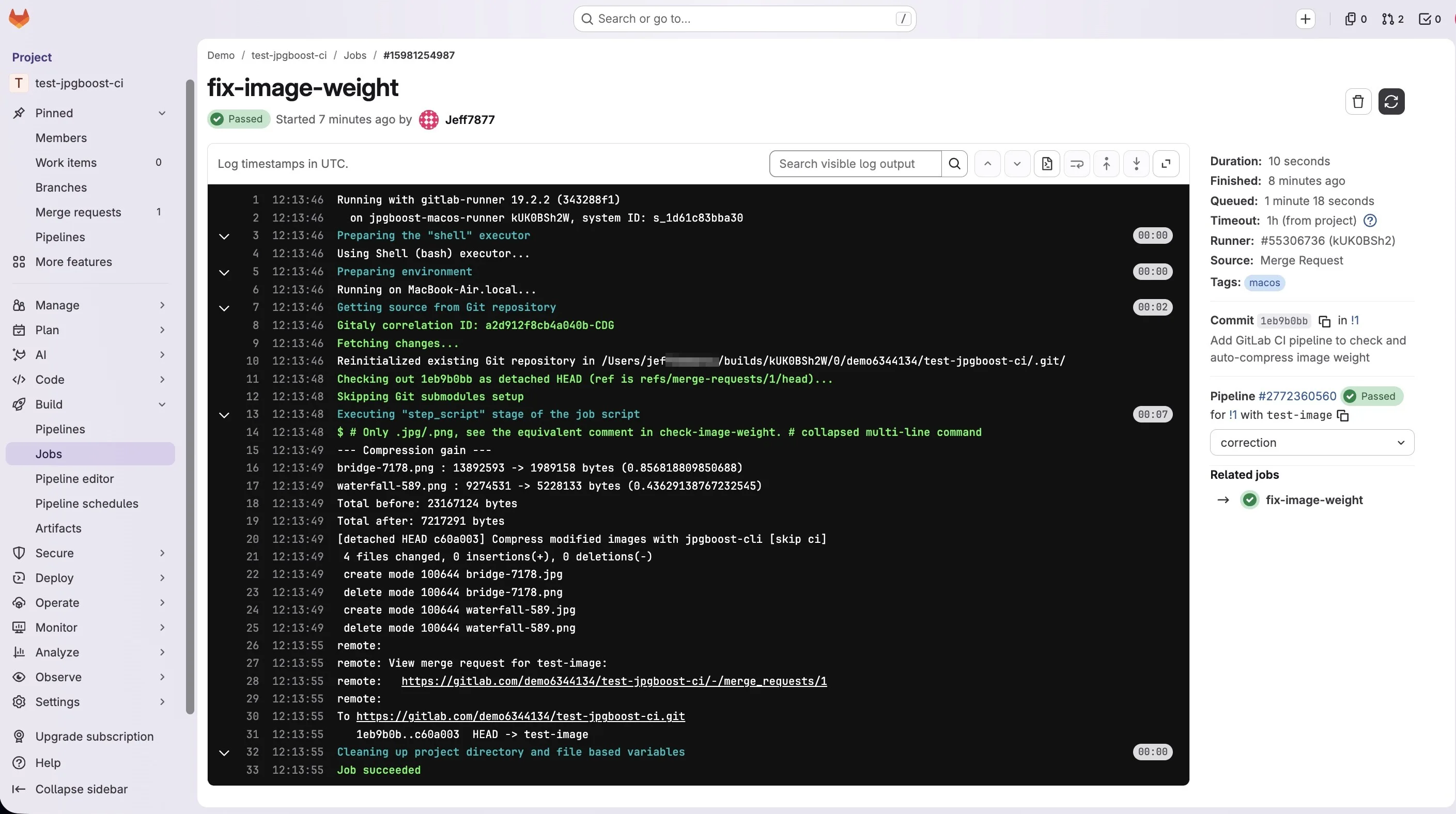
fix-image-weight job log prints the per-file gain and the totals before/after compressionjq -r '.[] | "\(.path) : \(.originalSizeBytes) -> \(.compressedSizeBytes) bytes (\(.ratio))"' /tmp/report.jsonFor the aggregate total, the exact command depends on how the job writes /tmp/report.json. fix-image-weight writes one JSON array per file as it loops (>>), so the final file contains several concatenated arrays rather than one. -s (slurp) is then needed to read the whole thing, but it wraps those arrays in an extra array: map fails directly on that (jq: error: Cannot index array with string) without an add to flatten them first. That's the form used in the script above.
# Total before and after compression, across the whole batch
# (file written across multiple calls: fix-image-weight)
jq -s 'add | map(.originalSizeBytes) | add' /tmp/report.json
jq -s 'add | map(.compressedSizeBytes) | add' /tmp/report.json
If you're building your own report elsewhere, locally (see "Install jpgboost-cli") or in check-image-weight, which compresses every file in a single call (>), /tmp/report.json is already a single JSON array there, and -s is then neither necessary nor correct: it produces the same error, for the opposite reason, by wrapping an array that's already complete.
# Same calculation, on a report written in a single call (local test, or check-image-weight)
jq 'map(.originalSizeBytes) | add' /tmp/report.json
jq 'map(.compressedSizeBytes) | add' /tmp/report.json
jpgboost-cli only measures what it produces itself: size before and after. Performance scores (LCP, Lighthouse score) still need to be obtained separately, with a dedicated tool. Nothing in the tool calculates that natively, and artificially tying it to the compression percentage would be an unverified extrapolation.